Chapter 1
Here is where we set the tone for the entire journey ahead. Whether you're completely new to digital sculpting or coming from a traditional background, this chapter is designed to introduce you to the ZBrush ecosystem in a way that feels approachable, empowering, and creatively inspiring. ZBrush is unlike any other 3D software. It encourages a more organic, intuitive way of creating—more like sculpting in clay than building with edges and vertices. This chapter is about making that mental shift and giving you the tools to enjoy it.
We begin with a brief history of ZBrush—how it broke the mold of traditional 3D modeling pipelines and opened the door for artists to sculpt with millions of polygons in real time. This context matters because understanding why ZBrush works the way it does helps demystify many of the interface decisions that often confuse new users. You’ll learn how the philosophy of ZBrush puts creativity first, and how its toolset is designed to support exploration, iteration, and spontaneity.

Ryan Darling


Chapter 1 – Getting Started with ZBrush
Chapter OVERVIEW
Introduction to ZBrush, what it is and what makes it different from traditional 3D modeling tools
Overview of how ZBrush thinks: sculpting-first mindset vs. polygonal box modeling
Understanding the unique interface and its layout
Key terminology:
Subtools, Dynamesh, ZAdd/ZSub, Brushes and Alphas, Polygroups
Lightbox and project file navigation
Introduction to basic navigation: zoom, pan, rotate
Overview of brush behavior and sculpting with symmetry
Saving projects and tools vs. exporting
Common beginner misconceptions and how to avoid them
Setting expectations: embracing experimentation and imperfection early on
This chapter lays the groundwork for everything to come. By getting familiar with ZBrush’s unique approach, language, and interface, you'll be positioned to sculpt with more confidence in the chapters ahead. Think of this as your on-ramp to a much bigger creative journey.
DOWNLOADS
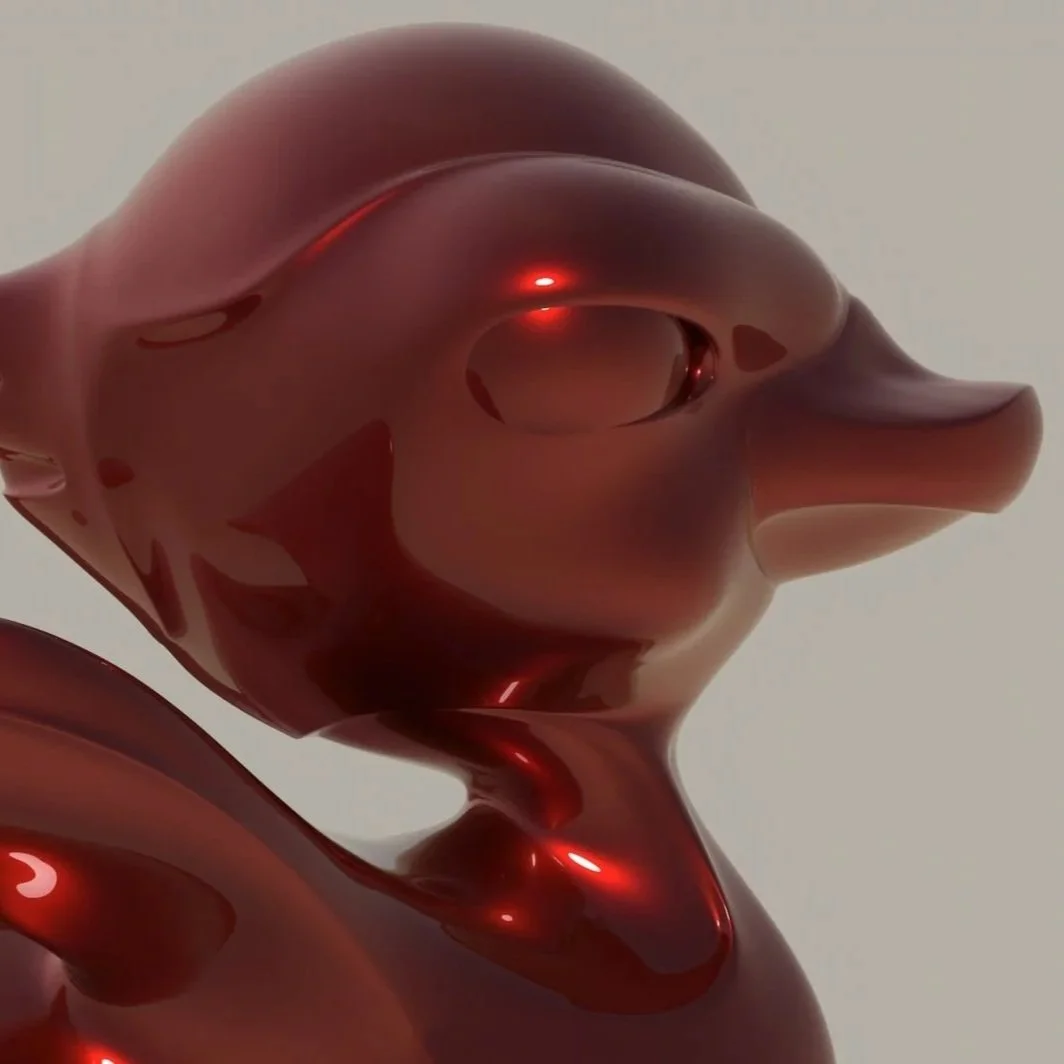
This stylized rubber ducky model is the perfect starter file to accompany Chapter 1 of the ZBrush Projects book. Designed to walk you through core principles of ZSketching with ZSpheres, this project demonstrates how to:
Build your base form with ZSpheres
Convert to a sculptable mesh
Smooth and refine the surface for a clean, finished look
What’s Included:
Complete ZBrush project file (.ZTL)
Render-ready pose
Bonus BPR Composite Image (for presentation reference)
Ideal For:
Artists learning foundational workflows and developing clean topology for stylized characters.
Format: ZBrush ZTool (.ZTL)
Skill Level: Beginner
File Size: 198.09 MB

Description:
This vintage key silhouette is a simple yet powerful exercise for exploring the use of ShadowBox and Snapshot3D inside ZBrush. Designed as a hands-on project, this file walks you through how to:
Import and use black-and-white alpha shapes
Generate complex 3D forms with ShadowBox
Create props using Snapshot3D
Apply boolean operations to refine your shape
What’s Included:
Complete ZBrush project file (.ZPR)
Included silhouette alphas (.PSD, .JPG)
Pre-configured ShadowBox workspace
Ideal For:
Artists learning how to bridge 2D shape language with 3D modeling, especially those interested in props, silhouettes, and hard-surface practice workflows.
Format: Photoshop File (.PSD)
Skill Level: Beginner – Intermediate
File Size: 2.57 MB